
Add Voice Narration to Your Playwright Tutorial Tests
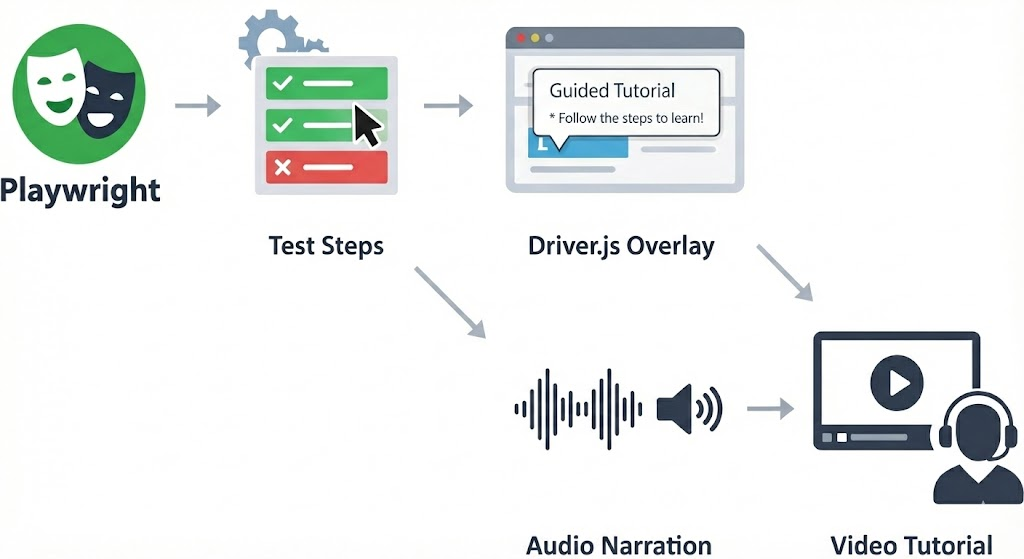
TL;DR
Add speech fields to your Playwright tutorial highlights and a speak() call or two. Set TTS=edge-tts and your silent walkthroughs become narrated videos with Microsoft neural voices, merged via ffmpeg.
Source code: MLgentDev/playwright-tests-as-tutorials
Intro
In the previous post we turned Playwright tests into visual tutorials by injecting Driver.js overlays at runtime. One environment variable flips between fast CI tests and headed walkthroughs with spotlighted elements and popovers.
The result is useful but silent. The recorded videos show overlays appearing and disappearing without any spoken context. Popovers vanish after three seconds, and anyone watching the recording later has to pause and squint to read them. For onboarding videos, accessibility, or async demos, you really want a voice explaining what's happening.
This post adds voice narration to the same system. The test code barely changes: a speech field on highlights and a standalone speak() call. But the output goes from silent screen recording to narrated video with Microsoft neural voices.
The problem with silent tutorials
The overlay-based tutorials from post one work well when you're watching live. But they fall short once you're not in the room.
Recorded videos lose context. Popovers are on screen for three seconds. In a recording, the viewer can't pause the overlay or re-read the text at their own pace. Screen readers can't access Driver.js popovers either, since they're injected DOM elements with no ARIA semantics. And when you share a tutorial video in a Slack thread or embed it in docs, there's nobody present to explain what's happening.
Two backends, one API
The narration system supports two TTS backends selected by a single environment variable. Test code is identical for both; only the TTS env var changes:
| Web Speech API | edge-tts | |
|---|---|---|
| Runs where | Browser (Chromium) | Node.js → browser playback |
| Voices | OS-provided | Microsoft neural voices (online) |
| Quality | Varies by OS | Consistently high (e.g. en-US-EmmaMultilingualNeural) |
| Audio in video | No. Browser-side audio isn't captured by Playwright's video recorder | Yes. MP3 chunks merged into WebM via ffmpeg |
| Extra deps | None | @andresaya/edge-tts, ffmpeg on PATH |
| Env var | TTS=web-speech-api (default) | TTS=edge-tts |
| Best for | Live demos, quick local previews | Producing narrated video artifacts |
The key difference: Web Speech API plays audio through the browser's audio output, which Playwright's video recorder doesn't capture. Edge-tts synthesizes audio as MP3 buffers on the Node side, tracks their time offsets, and merges them into the recorded video via ffmpeg after the test finishes. If you want narrated videos you can share, use edge-tts.
A note on edge-tts: The @andresaya/edge-tts package reverse-engineers Microsoft's Edge Read Aloud API. It is not an official Microsoft product and may violate their Terms of Service. This makes it fine for local development, demos, and experimentation, but not for production workloads. If you need TTS in production, look at Azure AI Speech
Architecture
Here's how speech flows through the system:
Test file (tests/*.spec.ts)
  │
  │  tutorial.speak('Welcome to the tutorial')
  │  tutorial.highlight('.input', { speech: 'Type here' })
  │
  ▼
Tutorial class (lib/tutorial.ts)
  │
  │  active=true?  ──no──▶  return (no-op)
  │       │
  │      yes
  │       │
  │  _speak() dispatches based on TTS env var
  │       │
  │       ├── TTS=web-speech-api ──▶ page.evaluate() ──▶ SpeechSynthesisUtterance
  │       │                          (browser-side, live audio only)
  │       │
  │       └── TTS=edge-tts ──▶ EdgeTTS.synthesize() on Node
  │                │               │
  │                │          base64 MP3 buffer
  │                │               │
  │                ├── page.evaluate() ──▶ new Audio(data:...) ──▶ live playback
  │                │
  │                └── audioChunks.push({ buffer, offsetMs })
  │                                           │
  ▼                                           │
Fixture teardown (lib/fixtures.ts)            │
  │                                           │
  │  page.close() ── stop video recording     │
  │  video.saveAs() ── flush video file       │
  │       │                                   │
  │       ▼                                   ▼
  │  mergeAudioWithVideo(videoPath, chunks, outputPath)
  │       │
  │       │  ffprobe ── get video duration
  │       │  write temp MP3 files
  │       │  ffmpeg ── adelay filters + amix + libopus encode
  │       │
  │       ▼
  │  video-narrated.webm attached to HTML report
When using Web Speech API, the path is simple: page.evaluate() fires a SpeechSynthesisUtterance and resolves when it finishes. No artifacts are produced.
When using edge-tts, each synthesis call produces an MP3 buffer that's both played back live in the browser and stored with its time offset. After the test completes, the fixture teardown merges all chunks into the recorded video.
Two ways to trigger speech
Standalone narration with speak()
Use speak() when you want narration without a visual overlay: introductions, transitions, or closing remarks:
// Introduce the app before any highlights
await tutorial.speak('Welcome to the TodoMVC tutorial. Let\'s learn how to manage a todo list.');
speak() is a no-op when the tutorial is inactive. It blocks until the utterance finishes, so the test doesn't race ahead of the narration.
Concurrent speech with highlight()
Add a speech field to any highlight() call to narrate while the overlay is visible:
await tutorial.highlight('.new-todo', {
  title: 'New Todo Input',
  text: 'Type your todo item here and press Enter.',
  side: 'bottom',
  speech: 'This is the input field where you type new todo items.',
});
Notice that text (the popover body) and speech (the spoken words) are independent. The popover might say "Type your todo item here and press Enter" while the voice says something more conversational. Concise text works better for visual scanning; natural phrasing works better for audio.
Under the hood, highlight() runs the display timeout and speech in parallel with Promise.all:
// From lib/tutorial.ts - _highlightElement()
const waitPromises: Promise<void>[] = [
  this._page.waitForTimeout(options.timeout ?? DEFAULT_HIGHLIGHT_TIMEOUT),
];
if (options.speech) {
  waitPromises.push(this._speak(options.speech));
}
await Promise.all(waitPromises);
The overlay stays visible until both the timeout elapses and speech finishes. If the voice takes longer than 3 seconds, the overlay waits. If the voice is shorter, it still shows for the full timeout.
SpeakOptions
Both speak() and highlight() accept speech tuning options:
export interface SpeakOptions {
  /** Speech rate (0.1–10). Default: 1.0 */
  rate?: number;
  /** Speech pitch (0–2). Default: 1.0 */
  pitch?: number;
  /** BCP 47 language tag, e.g. 'en-US' */
  lang?: string;
  /** Edge TTS voice name, e.g. 'en-US-AriaNeural'. Only used with edge-tts backend. */
  voice?: string;
}
For speak(), pass options as the second argument. For highlight(), these fields aren't directly exposed on HighlightOptions. The speech field is a plain string. If you need fine-grained control over voice parameters for a highlight, use speak() separately before or after the highlight call.
Setup changes from post one
New dependency
npm install @andresaya/edge-tts
And ensure ffmpeg is on your PATH (for narrated video output). On Ubuntu: sudo apt install ffmpeg. On macOS: brew install ffmpeg.
Config: conditional Chromium args and timeout
The Playwright config gains two changes. The --enable-speech-dispatcher launch arg is now conditional, since it's only needed for Web Speech API, not edge-tts. And there's a 5-minute test timeout to accommodate speech synthesis delays:
// playwright.config.ts
export default defineConfig<TestOptions>({
  timeout: process.env.TUTORIAL ? 5 * 60_000 : undefined,
  // ...
  use: {
    // ...
    launchOptions: {
      slowMo: process.env.TUTORIAL ? 500 : 0,
      args: process.env.TUTORIAL && process.env.TTS !== 'edge-tts'
        ? ['--enable-speech-dispatcher']
        : [],
    },
  },
});
The --enable-speech-dispatcher flag tells Chromium to use the system's speech dispatcher on Linux. Edge-tts doesn't need it because synthesis happens in Node, not the browser.
Fixture: tutorialObj with teardown
The tutorialObj fixture replaces manual Tutorial construction. It creates the instance, records the start time for audio offset tracking, and handles teardown, merging audio chunks into the video when using edge-tts:
// lib/fixtures.ts
export const test = base.extend<TestOptions>({
  tutorial: [!!process.env.TUTORIAL, { option: true }],

  tutorialObj: async ({ page, tutorial: tutorialActive }, use, testInfo) => {
    const tut = new Tutorial(page, tutorialActive);
    tut.setStartTime(Date.now());
    await use(tut);

    // Teardown: merge audio chunks into the recorded video if applicable
    const chunks = tut.getAudioChunks();
    const isEdgeTts = process.env.TTS === 'edge-tts';
    if (!tutorialActive || !isEdgeTts || chunks.length === 0) return;

    const video = page.video();
    if (!video) return;

    try {
      await page.close();
      const dir = path.dirname(testInfo.outputPath(''));
      const videoPath = path.join(dir, 'video-complete.webm');
      await video.saveAs(videoPath);
      const outputPath = path.join(dir, 'video-narrated.webm');
      mergeAudioWithVideo(videoPath, chunks, outputPath);
      await testInfo.attach('narrated-video', {
        path: outputPath,
        contentType: 'video/webm',
      });
      fs.unlinkSync(videoPath);
      fs.unlinkSync(outputPath);
    } catch (err) {
      console.warn('[tutorial] Failed to merge audio into video:', err);
    }
  },
});
Tests destructure tutorialObj instead of the raw tutorial boolean:
test('add and complete a todo', async ({ page, tutorialObj: tutorial }) => {
  // tutorial is a fully configured Tutorial instance
});
Tutorial class: TTS dispatch
The Tutorial class gains a _speak() dispatcher that routes to the correct backend:
// lib/tutorial.ts
private async _speak(text: string, options?: SpeakOptions): Promise<void> {
  if (this._ttsBackend === 'edge-tts') {
    return this._speakEdgeTts(text, options);
  }
  return this._speakWebSpeechApi(text, options);
}
Web Speech API backend: entirely in the browser via page.evaluate(). Waits for voices to load, creates a SpeechSynthesisUtterance, and resolves when the utterance ends:
private async _speakWebSpeechApi(text: string, options?: SpeakOptions): Promise<void> {
  await this._page.evaluate(({ t, opts }) => {
    return new Promise<void>(async (resolve) => {
      if (window.speechSynthesis.getVoices().length === 0) {
        await new Promise<void>((voicesReady) => {
          window.speechSynthesis.onvoiceschanged = () => voicesReady();
          setTimeout(voicesReady, 3000);
        });
      }
      if (window.speechSynthesis.getVoices().length === 0) {
        resolve();
        return;
      }
      const utterance = new SpeechSynthesisUtterance(t);
      utterance.rate = opts?.rate ?? 1.0;
      utterance.pitch = opts?.pitch ?? 1.0;
      if (opts?.lang) utterance.lang = opts.lang;
      const timer = setTimeout(() => resolve(), 30_000);
      utterance.onend = () => { clearTimeout(timer); resolve(); };
      utterance.onerror = () => { clearTimeout(timer); resolve(); };
      window.speechSynthesis.speak(utterance);
    });
  }, { t: text, opts: options });
}
Edge-tts backend: on Node, then sends the base64-encoded MP3 to the browser for playback. Also saves the buffer and time offset for later video merging:
private async _speakEdgeTts(text: string, options?: SpeakOptions): Promise<void> {
  try {
    const voice = options?.voice ?? DEFAULT_EDGE_TTS_VOICE;
    const offsetMs = this._startTime > 0 ? Date.now() - this._startTime : -1;
    const tts = new EdgeTTS();
    await tts.synthesize(text, voice, {
      rate: options?.rate !== undefined
        ? `${options.rate >= 1 ? '+' : ''}${Math.round((options.rate - 1) * 100)}%`
        : undefined,
      pitch: options?.pitch !== undefined
        ? `${options.pitch >= 1 ? '+' : ''}${Math.round((options.pitch - 1) * 50)}Hz`
        : undefined,
      outputFormat: EDGE_TTS_FORMAT,
    });
    const base64 = await tts.toBase64();

    if (offsetMs >= 0) {
      this._audioChunks.push({ buffer: Buffer.from(base64, 'base64'), offsetMs });
    }

    await this._page.evaluate((audioData) => {
      return new Promise<void>((resolve) => {
        const audio = new Audio(`data:audio/mpeg;base64,${audioData}`);
        const timer = setTimeout(() => resolve(), 30_000);
        audio.onended = () => { clearTimeout(timer); resolve(); };
        audio.onerror = () => { clearTimeout(timer); resolve(); };
        audio.play().catch(() => { clearTimeout(timer); resolve(); });
      });
    }, base64);
  } catch {
    // Graceful degradation: silently skip speech on failure
  }
}
The try/catch around the entire edge-tts path means any failure (network error, invalid voice name, API outage) is silently swallowed. The test continues without narration.
The ffmpeg merge pipeline
The mergeAudioWithVideo() function in lib/audio-merger.ts takes the recorded WebM video and an array of AudioChunks (each with a buffer and millisecond offset) and produces a new WebM with narration baked in.
Here's what happens step by step:
- Probe the video duration with
ffprobeso the audio track spans the full video length. - Write each MP3 chunk to a temp file.
- Build an ffmpeg filter graph that positions each chunk at its correct time offset using
adelayfilters, mixes everything withamix, and adds a silent track to pad the full duration. - Copy the video stream (no re-encode) and encode the mixed audio as libopus for WebM.
The generated ffmpeg command looks roughly like this for a test with three speech chunks:
ffmpeg -y \
  -i "video-complete.webm" \                     # input 0: recorded video
  -f lavfi -t 45.2 -i anullsrc=r=48000:cl=stereo \ # input 1: silence for full duration
  -i "chunk-0.mp3" \                              # input 2: first speech chunk
  -i "chunk-1.mp3" \                              # input 3: second speech chunk
  -i "chunk-2.mp3" \                              # input 4: third speech chunk
  -filter_complex \
    "[2:a]adelay=1200|1200[a0]; \                  # chunk 0 starts at 1.2s
     [3:a]adelay=8500|8500[a1]; \                  # chunk 1 starts at 8.5s
     [4:a]adelay=22000|22000[a2]; \                # chunk 2 starts at 22s
     [1:a][a0][a1][a2]amix=inputs=4:normalize=0[aout]" \
  -map 0:v -map "[aout]" \                        # keep original video, use mixed audio
  -c:v copy -c:a libopus \                        # no video re-encode, opus audio
  "video-narrated.webm"
The anullsrc silent track ensures amix (with duration=longest) keeps the audio stream alive for the entire video. Without it, the audio track would end after the last speech chunk, leaving the rest of the video silent, or worse, causing ffmpeg to truncate.
The normalize=0 flag on amix prevents automatic volume normalization that would amplify silence between chunks.
Running it
Three modes, same test code:
Silent tests (CI, no highlights, no speech):
npx playwright test --project=chromium
Web Speech API (live speech through speakers, no audio in recording):
TUTORIAL=1 npx playwright test --headed --project=chromium
Edge-tts (neural voices, narrated video output):
TUTORIAL=1 TTS=edge-tts npx playwright test --headed --project=chromium
After an edge-tts run, open the HTML report:
npx playwright show-report
Click into the test result, and you'll find a narrated-video attachment, a WebM file with the original screen recording plus the synthesized narration mixed in at the correct timestamps.
Failure modes
Speech never breaks a test:
- No voices available (Web Speech API):
_speakWebSpeechApiwaits up to 3 seconds for voices to load. If none appear, it resolves immediately. The highlight shows, the voice is silent. - Edge-tts fails (network error, bad voice name): The entire
_speakEdgeTtsmethod is wrapped intry/catch. Any error is swallowed. The test continues. - No ffmpeg on PATH: The fixture teardown catches the
execSyncerror, logs a warning, and moves on. The test passes; you just don't get a narrated video. - No
TUTORIALenv var: Allhighlight()andspeak()calls are no-ops. Zero overhead, zero side effects. - Safety timeout: Both backends set a 30-second timeout on speech playback. If the
onendedevent never fires (browser bug, audio driver issue), the promise resolves after 30 seconds instead of hanging forever.
What you get
Add speech fields to highlights you'd write anyway, throw in a speak() call for transitions, and each edge-tts tutorial run produces a WebM with synchronized voice narration. Web Speech API is there for quick local previews; edge-tts with Microsoft neural voices is for the recordings you actually share.
Popover text and speech are independent, so you can write concise labels in popovers and natural sentences for narration. Without TUTORIAL=1, everything is still a no-op. No extra dependencies loaded, no slowdown, no network calls. And as covered above, if voices or ffmpeg aren't available, the test still passes.
The test is still a test. It asserts correctness, runs in CI without modification, and breaks when the UI changes. The narration is just a layer on top.